 ifindv’s Blog
斜杠命令是Claude Code中最基础的快捷方式,通过 /命令名的语法快速调用预定义功能。无论是内置命令还是自定义命令,都能让你在开发过程中更高效地与Claude交互。
核心概念#
斜杠命令#
斜杠命令是用户手动触发的快捷方式,位于 .claude/skills/或 .claude/commands/目录中。Claude Code提供了60+个内置命令,同时支持创建自定义命令来扩展功能。
内置命令#
内置命令是常见操作的快捷方式。共有60+个内置命令和5个捆绑技能可用。在Claude Code中输入 /查看完整列表,或输入 /后跟任何字母进行过滤。
| 命令 | 用途 |
|---|---|
/add-dir <path> | 添加工作目录 |
/agents | 管理代理配置 |
/branch [name] | 将对话分支到新会话(别名:/fork)。注意:/fork在v2.1.77中重命名为 /branch |
/btw <question> | 不添加到历史的旁注问题 |
/chrome | 配置Chrome浏览器集成 |
/clear | 清除对话(别名:/reset、/new) |
/color [color|default] | 设置提示栏颜色 |
/compact [instructions] | 使用可选聚焦指令压缩对话 |
/config | 打开设置(别名:/settings) |
/context | 以彩色网格可视化上下文使用情况 |
/copy [N] | 将助手响应复制到剪贴板;w写入文件 |
/cost | 显示token使用统计 |
/desktop | 在桌面应用中继续(别名:/app) |
/diff | 未提交更改的交互式diff查看器 |
/doctor | 诊断安装健康状态 |
/effort [low|medium|high|xhigh|max|auto] | 通过交互式箭头键滑块设置努力级别。级别:low → medium → high → xhigh(v2.1.111新增)→ max。Opus 4.7默认为 xhigh;max仅限Opus 4.7 |
/exit | 退出REPL(别名:/quit) |
/export [filename] | 将当前对话导出到文件或剪贴板 |
/extra-usage | 配置速率限制的额外使用 |
/fast [on|off] | 切换快速模式 |
/feedback | 提交反馈(别名:/bug) |
/focus | 切换焦点视图(v2.1.110新增;替换 Ctrl+O用于焦点切换) |
/help | 显示帮助 |
/hooks | 查看钩子配置 |
/ide | 管理IDE集成 |
/init | 初始化 CLAUDE.md。设置 CLAUDE_CODE_NEW_INIT=1以启用交互式流程 |
/insights | 生成会话分析报告 |
/install-github-app | 设置GitHub Actions应用 |
/install-slack-app | 安装Slack应用 |
/keybindings | 打开键绑定配置 |
/less-permission-prompts | 分析最近的Bash/MCP工具调用并将优先级允许列表添加到 .claude/settings.json以减少权限提示(v2.1.111新增) |
/login | 切换Anthropic账户 |
/logout | 退出Anthropic账户 |
/mcp | 管理MCP服务器和OAuth |
/memory | 编辑 CLAUDE.md,切换自动内存 |
/mobile | 移动应用的二维码(别名:/ios、/android) |
/model [model] | 使用左右箭头选择模型以调整努力 |
/passes | 分享Claude Code免费周 |
/permissions | 查看/更新权限(别名:/allowed-tools) |
/plan [description] | 进入规划模式 |
/plugin | 管理插件 |
/proactive | /loop的别名(v2.1.105新增) |
/powerup | 通过带动画演示的交互式课程发现功能 |
/privacy-settings | 隐私设置(仅Pro/Max) |
/release-notes | 查看更新日志 |
/recap | 返回会话时显示会话回顾/摘要(v2.1.108新增) |
/reload-plugins | 重新加载活动插件 |
/remote-control | 从claude.ai远程控制(别名:/rc) |
/remote-env | 配置默认远程环境 |
/rename [name] | 重命名会话 |
/resume [session] | 恢复对话(别名:/continue) |
/review | 已弃用 — 安装 code-review插件代替 |
/rewind | 回溯对话和/或代码(别名:/checkpoint) |
/sandbox | 切换沙箱模式 |
/schedule [description] | 创建/管理云端计划任务 |
/security-review | 分析分支的安全漏洞 |
/skills | 列出可用技能 |
/stats | 可视化每日使用情况、会话、连续天数 |
/stickers | 订购Claude Code贴纸 |
/status | 显示版本、模型、账户 |
/statusline | 配置状态栏 |
/tasks | 列出/管理后台任务 |
/team-onboarding | 从项目的Claude Code设置生成队友入门指南(v2.1.101新增) |
/terminal-setup | 配置终端键绑定 |
/theme | 更改颜色主题 |
/tui | 切换全屏TUI(文本用户界面)模式,无闪烁渲染(v2.1.110新增) |
/ultraplan <prompt> | 在ultraplan会话中起草计划,在浏览器中审查 |
/ultrareview | 基于云的多代理分析全面代码审查(v2.1.111新增) |
/undo | /rewind的别名(v2.1.108新增) |
/upgrade | 打开升级页面以获得更高计划层级 |
/usage | 显示计划使用限制和速率限制状态 |
/voice | 切换按住说话语音听写 |
捆绑技能#
这些技能随Claude Code一起提供,作为斜杠命令调用:
| 技能 | 用途 |
|---|---|
/batch <instruction> | 使用worktree编排大规模并行更改 |
/claude-api | 加载项目语言的Claude API参考 |
/debug [description] | 启用调试日志 |
/loop [interval] <prompt> | 在间隔上重复运行提示 |
/simplify [focus] | 审查更改文件的代码质量 |
自定义命令#
自定义斜杠命令已合并到技能中。两种方法都创建可用 /command-name调用的命令:
| 方法 | 位置 | 状态 |
|---|---|---|
| 技能(推荐) | .claude/skills/<name>/SKILL.md | 当前标准 |
| 传统命令 | .claude/commands/<name>.md | 仍然工作 |
如果技能和命令共享相同名称,技能优先。例如,当同时存在 .claude/commands/review.md和 .claude/skills/review/SKILL.md时,使用技能版本。
技能优势#
技能相比传统命令提供额外功能:
- 目录结构:捆绑脚本、模板和参考文件
- 自动调用:Claude可以在相关时自动触发技能
- 调用控制:选择用户、Claude或两者都可以调用
- 子代理执行:在具有
context: fork的隔离上下文中运行技能 - 渐进式披露:仅在需要时加载附加文件
创建技能#
创建包含 SKILL.md文件的目录:
mkdir -p .claude/skills/my-command文件:.claude/skills/my-command/SKILL.md
---
name: my-command
description: 此命令的功能以及何时使用它
---

# 我的命令

当调用此命令时,Claude应遵循的指令。

1. 第一步
2. 第二步
3. 第三步
Frontmatter 参数#
| 字段 | 用途 | 默认 |
|---|---|---|
name | 命令名称(变为 /name) | 目录名称 |
description | 简要描述(帮助Claude知道何时使用) | 第一段 |
argument-hint | 用于自动完成的预期参数 | 无 |
allowed-tools | 命令可以在无权限情况下使用的工具 | 继承 |
model | 要使用的特定模型 | 继承 |
disable-model-invocation | 如果为 true,只有用户可以调用(不是Claude) | false |
user-invocable | 如果为 false,从 /菜单隐藏 | true |
context | 设置为 fork以在隔离子代理中运行 | 无 |
agent | 使用 context: fork时的代理类型 | general-purpose |
hooks | 技能范围钩子(PreToolUse、PostToolUse、Stop) | 无 |
参数传递#
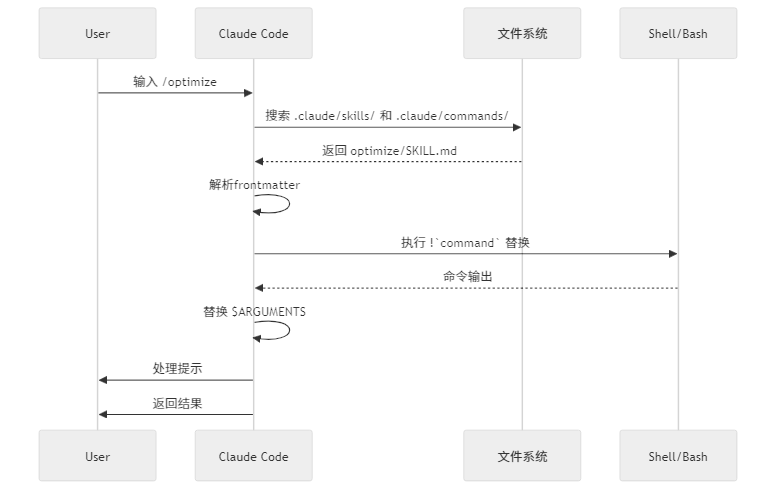
使用 $ARGUMENTS的所有参数:
---
name: fix-issue
description: 按编号修复GitHub问题
---

修复问题 #$ARGUMENTS,遵循我们的编码标准使用:/fix-issue 123 → $ARGUMENTS变为"123"
使用 $0、$1等的位置参数:
---
name: review-pr
description: 带优先级审查PR
---

以优先级$1审查PR #$0使用:/review-pr 456 high → $0=“456”, $1=“high”
上下文引用#
使用 !command``在提示之前执行bash命令:
---
name: commit
description: 使用上下文创建git提交
allowed-tools: Bash(git *)
---

## 上下文

- 当前git状态:!`git status`
- 当前git diff:!`git diff HEAD`
- 当前分支:!`git branch --show-current`
- 最近提交:!`git log --oneline -5`

## 你的任务

基于上述更改,创建单个git提交。文件引用#
使用 @包含文件内容:
审查@src/utils/helpers.js中的实现
比较@src/old-version.js与@src/new-version.js插件命令#
插件可以提供自定义命令:
/plugin-name:command-name或如果没有命名冲突,简单地使用 /command-name。
示例:
/frontend-design:frontend-design
/commit-commands:commit
MCP 命令#
MCP服务器可以将提示公开为斜杠命令:
/mcp__<server-name>__<prompt-name> [arguments]示例:
/mcp__github__list_prs
/mcp__github__pr_review 456
/mcp__jira__create_issue "Bug title" high
MCP 权限#
在权限中控制MCP服务器访问:
mcp__github- 访问整个GitHub MCP服务器mcp__github__*- 通配符访问所有工具mcp__github__get_issue- 特定工具访问
架构#
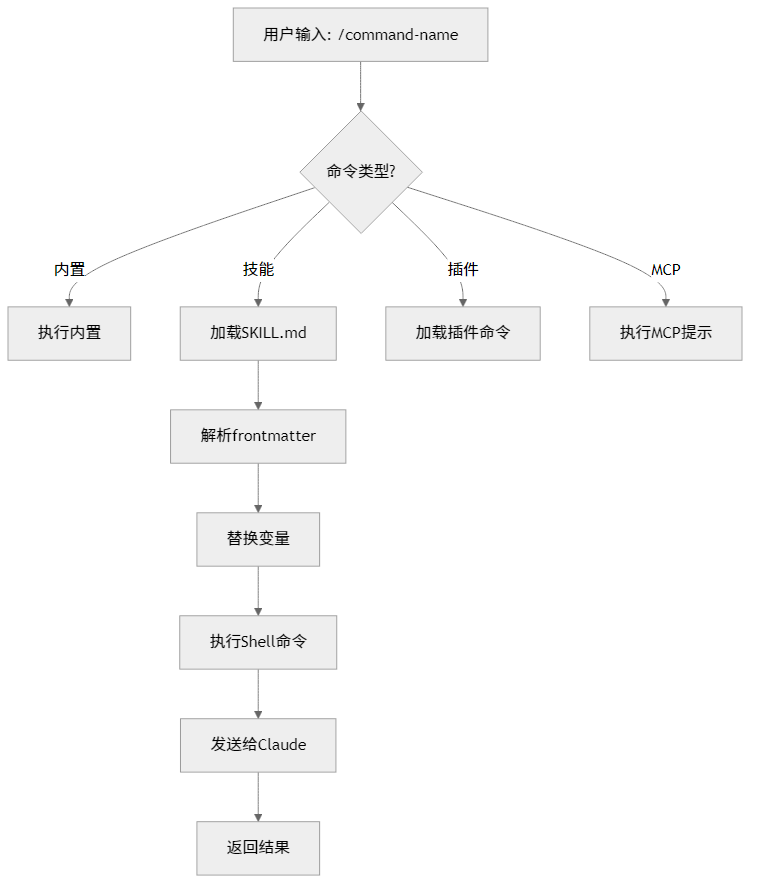
生命周期#
实用示例#
代码优化#
---
description: Analyze code for performance issues and suggest optimizations
---

# Code Optimization

Review the provided code for the following issues in order of priority:

1. **Performance bottlenecks** - identify O(n²) operations, inefficient loops
2. **Memory leaks** - find unreleased resources, circular references
3. **Algorithm improvements** - suggest better algorithms or data structures
4. **Caching opportunities** - identify repeated computations
5. **Concurrency issues** - find race conditions or threading problems

Format your response with:
- Issue severity (Critical/High/Medium/Low)
- Location in code
- Explanation
- Recommended fix with code example

---
**Last Updated**: April 9, 2026PR准备#
---
description: Clean up code, stage changes, and prepare a pull request
allowed-tools: Bash(git add:*), Bash(git status:*), Bash(git diff:*), Bash(npm test:*), Bash(npm run lint:*)
---

# Pull Request Preparation Checklist

Before creating a PR, execute these steps:

1. Run linting: `prettier --write .`
2. Run tests: `npm test`
3. Review git diff: `git diff HEAD`
4. Stage changes: `git add .`
5. Create commit message following conventional commits:
   - `fix:` for bug fixes
   - `feat:` for new features
   - `docs:` for documentation
   - `refactor:` for code restructuring
   - `test:` for test additions
   - `chore:` for maintenance

6. Generate PR summary including:
   - What changed
   - Why it changed
   - Testing performed
   - Potential impacts

---
**Last Updated**: April 9, 2026API文档生成#
---
description: Create comprehensive API documentation from source code
---

# API Documentation Generator

Generate API documentation by:

1. Scanning all files in `/src/api/`
2. Extracting function signatures and JSDoc comments
3. Organizing by endpoint/module
4. Creating markdown with examples
5. Including request/response schemas
6. Adding error documentation

Output format:
- Markdown file in `/docs/api.md`
- Include curl examples for all endpoints
- Add TypeScript types

---
**Last Updated**: April 9, 2026代码提交#
---
description: Create git commit with dynamic context from repository
allowed-tools: Bash(git add:*), Bash(git commit:*), Bash(git status:*), Bash(git diff:*), Bash(git log:*)
---

# Git Commit with Context

Create a git commit with relevant repository context.

## Steps

1. Run in parallel to gather context:
   - `git status` - show working tree status
   - `git diff` - show both staged and unstaged changes
   - `git log -1 --oneline` - show recent commit message

2. Analyze all staged and newly added changes

3. Draft a concise commit message:
   - Summarize the nature of the changes (eg. new feature, enhancement to an existing feature, bug fix, refactoring, test, docs, etc.)
   - Ensure the message accurately reflects the changes and their purpose (i.e. "add" means a wholly new feature, "update" means an enhancement to an existing feature, "fix" means a bug fix, etc.)
   - Do not commit files that likely contain secrets (.env, credentials.json, etc). Warn the user if they specifically request to commit those files
   - Draft a concise (1-2 sentences) commit message that focuses on the "why" rather than the "what"
   - Ensure it accurately reflects the changes and their purpose

4. Run sequentially:
   - Add relevant untracked files
   - Create commit with message
   - Run git status after commit to verify success

---
**Last Updated**: April 9, 2026代码推送#
---
description: Stage all changes, create commit, and push to remote (use with caution)
allowed-tools: Bash(git add:*), Bash(git status:*), Bash(git commit:*), Bash(git push:*), Bash(git diff:*), Bash(git log:*), Bash(git pull:*)
---

# Commit and Push Everything

⚠️ **CAUTION**: Stage ALL changes, commit, and push to remote. Use only when confident all changes belong together.

## Workflow

### 1. Analyze Changes
Run in parallel:
- `git status` - Show modified/added/deleted/untracked files
- `git diff --stat` - Show change statistics
- `git log -1 --oneline` - Show recent commit for message style

### 2. Safety Checks

**❌ STOP and WARN if detected:**
- Secrets: `.env*`, `*.key`, `*.pem`, `credentials.json`, `secrets.yaml`, `id_rsa`, `*.p12`, `*.pfx`, `*.cer`
- API Keys: Any `*_API_KEY`, `*_SECRET`, `*_TOKEN` variables with real values (not placeholders like `your-api-key`, `xxx`, `placeholder`)
- Large files: `>10MB` without Git LFS
- Build artifacts: `node_modules/`, `dist/`, `build/`, `__pycache__/`, `*.pyc`, `.venv/`
- Temp files: `.DS_Store`, `thumbs.db`, `*.swp`, `*.tmp`

**✅ Verify:**
- `.gitignore` properly configured
- No merge conflicts
- Correct branch (warn if main/master)
- API keys are placeholders only

### 3. Request Confirmation

Present summary and wait for explicit "yes" before proceeding.

### 4. Execute (After Confirmation)

Run sequentially:
```bash
git add .
git status # Verify staging文档重构#
---
name: Documentation Refactor
description: Restructure project documentation for clarity and accessibility
tags: documentation, refactoring, organization
---
# Documentation Refactor

Refactor project documentation structure adapted to project type:

1. **Analyze project**: Identify type (library/API/web app/CLI/microservices), architecture, and user personas
2. **Centralize docs**: Move technical documentation to `docs/` with proper cross-references
3. **Root README.md**: Streamline as entry point with overview, quickstart, modules/components summary, license, contacts
4. **Component docs**: Add module/package/service-level README files with setup and testing instructions
5. **Organize `docs/`** by relevant categories:
   - Architecture, API Reference, Database, Design, Troubleshooting, Deployment, Contributing (adapt to project needs)
6. **Create guides** (select applicable):
   - User Guide: End-user documentation for applications
   - API Documentation: Endpoints, authentication, examples for APIs
   - Development Guide: Setup, testing, contribution workflow
   - Deployment Guide: Production deployment for services/apps
7. **Use Mermaid** for all diagrams (architecture, flows, schemas)

Keep docs concise, scannable, and contextual to project type.CI/CD#
---
name: Setup CI/CD Pipeline
description: Implement pre-commit hooks and GitHub Actions for quality assurance
tags: ci-cd, devops, automation
---
# Setup CI/CD Pipeline

Implement comprehensive DevOps quality gates adapted to project type:

1. **Analyze project**: Detect language(s), framework, build system, and existing tooling
2. **Configure pre-commit hooks** with language-specific tools:
   - Formatting: Prettier/Black/gofmt/rustfmt/etc.
   - Linting: ESLint/Ruff/golangci-lint/Clippy/etc.
   - Security: Bandit/gosec/cargo-audit/npm audit/etc.
   - Type checking: TypeScript/mypy/flow (if applicable)
   - Tests: Run relevant test suites
3. **Create GitHub Actions workflows** (.github/workflows/):
   - Mirror pre-commit checks on push/PR
   - Multi-version/platform matrix (if applicable)
   - Build and test verification
   - Deployment steps (if needed)
4. **Verify pipeline**: Test locally, create test PR, confirm all checks pass

Use free/open-source tools. Respect existing configs. Keep execution fast.单元测试扩展#
---
name: Expand Unit Tests
description: Increase test coverage by targeting untested branches and edge cases
tags: testing, coverage, unit-tests
---
# Expand Unit Tests

Expand existing unit tests adapted to project's testing framework:

1. **Analyze coverage**: Run coverage report to identify untested branches, edge cases, and low-coverage areas
2. **Identify gaps**: Review code for logical branches, error paths, boundary conditions, null/empty inputs
3. **Write tests** using project's framework:
   - Jest/Vitest/Mocha (JavaScript/TypeScript)
   - pytest/unittest (Python)
   - Go testing/testify (Go)
   - Rust test framework (Rust)
4. **Target specific scenarios**:
   - Error handling and exceptions
   - Boundary values (min/max, empty, null)
   - Edge cases and corner cases
   - State transitions and side effects
5. **Verify improvement**: Run coverage again, confirm measurable increase

Present new test code blocks only. Follow existing test patterns and naming conventions.最佳实践#
Do’s ✅#
- 使用清晰、动作导向的命令名称
- 在
description中包含触发条件关键词 - 为命令添加具体示例和使用说明
- 使用
disable-model-invocation防止意外执行副作用操作 - 组织相关文件到命令目录中
- 在生产环境前测试命令
Don’ts ❌#
- 为一次性任务创建命令
- 在命令中硬编码敏感信息
- 跳过
description字段 - 让命令过于复杂或涵盖多个不相关的功能
- 假设Claude知道当前项目状态
- 忘记添加工具权限配置(
allowed-tools)